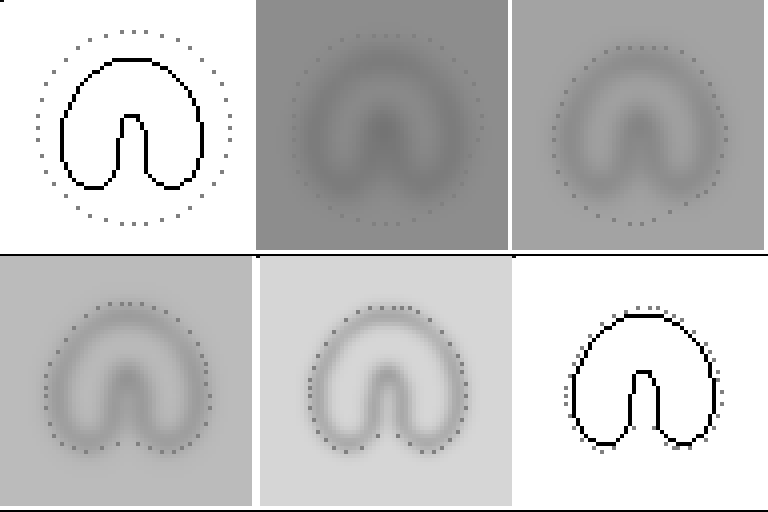
Program Description and Development:
The primary
issue that was observed with the program initially was one of portability. Initially the
program was just one long function that made it quite impossible to debug. As the design
matured the code was split up into different functions and different source files.
Currently the main snake program consists of 3 files (driver.c, snake-defs.c and
snakedefs.h). This roughly corresponds to a framework that would enable plugging in of
different energy functions and structures. This would enable easier implementations of
different algorithms if required and enabled debugging to be localized. Vision X being a
command line environment, the program has been designed to accept the different parameters
from the command line, including the input and output files, the starting location and
size of the snake, number of nodes in the snake, and the weights attached to the different
energy functions. A full description of the options offered by the vsnake executable is
detailed in the man page that accompanies this document in Appendix B.
The file snakedefs.h is a header file containing the global variables and the definition of the structure of the snake. The snake is defined as a structure that contains several pieces of information – 2 arrays named x and y that contain the x and y co-ordinates of the points that make up the snake and the integer variable ‘node’. The latter is used to store the number of points that make up the snake. Also defined in the header file is a constant named the WILLIAMS_AND_SHAH_ALGORITHM. The function that actually runs the snake is currently coded up to use the Kass snake if and only if this constant is set to true. So, when multiple snake algorithms are added to our snake function, simply adding more constants and recompiling allows the user to switch between snake algorithms. This file also contains all the standard C and VisionX headers we call in a central location. This solved a problem we had with multiple declarations of standard symbols from the header files.
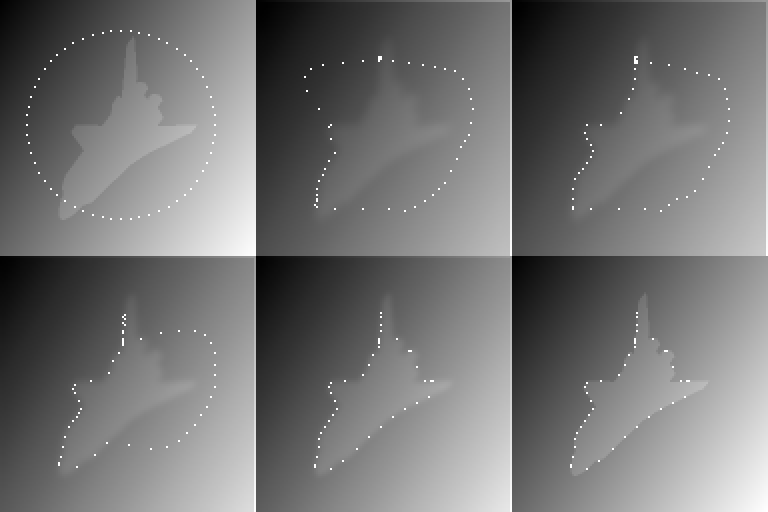
The file
driver.c contains the user-interface part of the code. It accepts command-line input and
parses the arguments using standard VisionX commands and functions as shown in the labs.
Several of the options are not always necessary but other (like length) are. One of the
features of this program is that it allows users to define the starting position of a
snake in 2 ways. The user can choose to define the snake as a circle by specifying the
center of the circle and its radius; or she can specify a file that contains the points
that define the snake. This file has as its first line a number that states how many
points there are in the file. The rest of the file consists of integer co-ordinates that
are delimited by spaces and new lines. This feature is especially useful on images where
due to large localized changes in illumination or gradients a snake would perform badly if
starting off as a circle. In essence this feature allows the user to give a snake
“hints” about which areas to go to.
The file
then performs the actual work of relaxing the snake by repeatedly blurring the image and
then calling the relax_snake function. Both of these functions are extremely generic. The
blurring function merely takes in an image and the relax_snake function takes in very
generic parameters that describe the image, the starting co-ordinates of the snake, and
the number of iterations the snake should run for. The generic nature of these function
interfaces implies that the internal definition of these functions can be changed easily
without changing the main driver program.
At each
step the image is blurred a little less and the snake is iterated for some specific number
of iterations. After each iteration of blurring and snake relaxation, the resulting
blurred image and position of the snake are written out as a frame to the output file.
This allows the user to see a sequence of images that shows how the snake converges to the
region of interest over time.
Finally,
after the snake has converged, just before driver.c exits, it prints out the points that
define the snake into a file named “snake.poly”. This allows the user to keep track of the points of the final
position of the snake and perhaps use it later on as we tried to do to calculate how well
the snake performed.
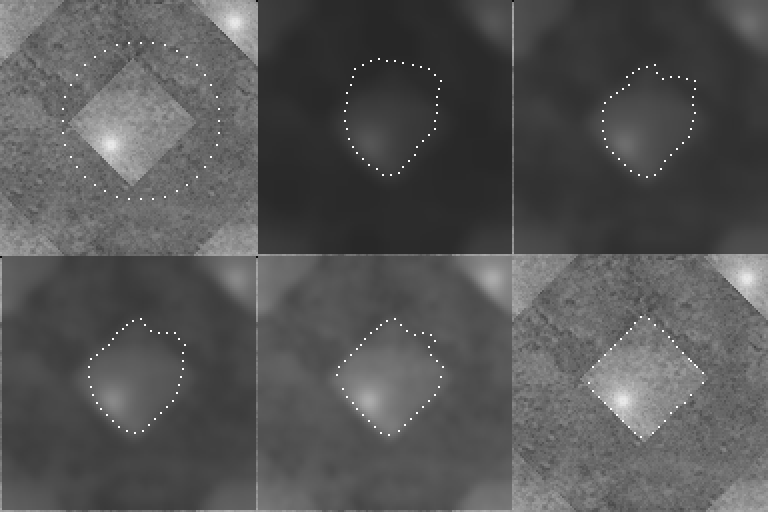
The real
work of the snake is done in the snake-defs.c file. This defines several functions that
take in algorithm-dependent parameters to compute the various energy values. The main
piece of code in this file is the relax_snake function that is called from driver.c. Right
now this function just implements the Kass snake but as mentioned above in the description
of the header file, it can be easily extended to implement many different snake algorithms
with minimal changes to existing code. Our
implementation of the Kass snake lets us choose different thresholds to perform our energy
calculations on. Currently we use a 7x7 window to find new positions for snake points.
There is a bug in the code that causes segmentation faults if the snake gets too close to
a boundary (within 3 pixels of it) since an illegal array reference occurs at that point.
Given more time we could have fixed the bug but we elected to work on testing images where
the object of interest is well within the boundaries of the image.
The other
code we wrote was an error program that took in 2 files on the command line that described
2 polygons. The program then calculates the polygons that are the union and intersection
of these 2 polygons. It then finds the areas of these polygons and uses them to calculate
an error measure. We created this file to allow us to automatically use the snake.poly
file discussed above to gauge how effective the snake was on a particular image with a
particular choice of parameters. We also developed a driver program in Perl (a scripting
language), that ran the vsnake program multiple times with a range of parameters we gave
it and for each run calculated the error using this program and wrote out these statistics
to a file. This was particularly useful because as we soon found out, snakes are extremely
sensitive to initial conditions. Although with experience, we were able to eyeball an
image and make rough estimates of the parameters that would enable a snake to work
correctly on it, fine-tuning the parameters was easily a black art. Our script was
extremely useful here since we were able to run it over long periods of time and come back
and look at the results it had produced.
However, we
ran into a problem running this script that we were unable to fix in the allotted time.
The code that determines the union and intersection polygons for 2 different polygons is
extremely complicated (it is some 2200 lines of code). We were able to find a freeware
library[1] on the Internet that did these computations on extremely general polygons that
have holes and multiple contours etc. Sometimes the snake, in an effort to preserve
distances between points doubles back on itself. This causes the resulting snake polygon
to lose its simple convex nature. We didn’t have time to explore how to find out when
this happened. Hence the input files we gave the error code caused it to fail since the
error code thought that the polygons were not simple convex polygons unlike what our input
files stated.
Other code
we used for the project but did not write included a series of Matlab files that allowed
us to create and evaluate the performance of GVF snakes. We also found this code[2]
available freely on the Internet. We did modify it however, to work with our files since
initially the code was restricted to only working with 2 sample images that it came
packaged with.
To
conclude, we developed about 800 lines of code for this project. Initially we wanted to
write each function as a separate command-line program for maximum flexibility but C fork
commands are expensive and our code was
crippled by all the threads that we were starting up to compute different operators. For
this reason, it was difficult for us to take advantage of VisionX commands like vsobel
since if we tried to use them, our code became too slow to test. We spent a lot of time
trying to figure out how to write functions that did fundamental imaging operations like
computing areas of polygons, or deciding pixel inclusion in polygons or computing
gradients with edge constraints correctly etc.
The code that we wrote for the Shah snake is quite efficient. We didn’t do formal tests, but it takes roughly 8 seconds to do about a thousand iterations on a 128x128 image with 20 blur steps. Blurring is the most time consuming part of the code, and a quick profile showed that it was consuming more than 50% of time in the code. Again, we didn’t have time to write a more efficient blur function but that is something we would definitely do prior to extensive production use of the program.